Yksityinen kielitoimisto

  • Services
  • Resources
  • Publications
  • Conferences
  • About
You are here: Home / Archives for kielitoimisto

Record Your Journey in a Blog

17.1.2017

17A blog is a wonderful aid for learning. The teacher can use the blog as a course home page: you can publish the learning materials, tasks and notifications and have conversations about them on the blog. The learners on the other hand, can start their own blogs in which they can carry out the tasks and monitor their learning. The blogs can be either private or public.

It Only Takes a Minute

There are plenty of free blogging services available and starting a blog, as well as using it, is extremely simple. The services can be compared based on their features, usability and permanence. Google’s Blogger is fairly familiar and an easy choice because it allows you to select your preferred language, including Finnish. The multilingual WordPress offers a ready-made blog as well as open-source blog software for downloading. Edublogs offers diaries specifically meant for teaching, but the only language option is English. If the language you use in the course is, for example, Swedish or Finnish, I absolutely recommend selecting a platform which comes in that language.

Creating a blog is easy by following a few guided steps. The blog services offer many simplepresentations and videos which will give you extra information. The real work starts when you get to the content production.

Blog to Build Your Home Base, to Share Material, for Extra Flavour

If you make the blog into a home base for your course, the way to begin is to plan the general plot for it, the number of blog posts and content. The planning progresses the same way it normally does for an online course. Face-to-face teaching can also be supplemented with online material.

The teacher can also write the learning material for the course on the blog and publish it bit by bit during the course. In an expert blog, the course’s themes are dealt with more freely and it functions as additional reading material. At its best, the teacher’s blog will become a widely read bestseller like Steven Wheeler’s Learning with ‘e’s.

The teaching can also be spiced up with a video or a picture blog, and the treatment doesn’t have to be too serious either. I have often used my Kielikuvia mobile blog, which takes a playful look at publicly made language mistakes.

The usage of blogs is of course most effective when the students themselves write it either alone or in groups. A blog combines the benefits of writing and publishing. Blogging becomes better motivated if private blogs are opened to the entire group and they receive comments. In the best scenario, the learning diary will grow into an expert blog in time.

One part of blogging is following other blogs – or the blogosphere. Good tips on the useful blogs to follow can be found on blog lists and blogs recommended by experts. It really pays to get to know, for instance, well-known edubloggers.
Filed Under: In English, Spice Up Your Teaching with Social Media, Spice Up Your Teaching with Social Media

Wiki Works Wonders

16.1.2017

A wiki is an incomparable tool for social learning! It is at its best in collaborative writing, but it also works well as information storage, as a discussion board, or in internal communication.

A wiki is often automatically associated with Wikipedia, but it really is a piece of software that can be used in any type of content production. It’s easiest for the teacher to use the services where you can open your own wiki in a matter of minutes, as easily as a blog. It doesn’t tax your technical skills to simply click on the Edit and Save buttons. WikiSpaces and WikiDot, among others, offer free wikis.

For teaching, however, I can also warmly recommend the public wiki projects. The students are normally excited about taking part in international projects, and open publication is motivational.

Wikipedia offers suitable source material and can be supplemented with new articles: also, the existing articles are easy to edit and new ones can be created by translating Wikipedia entries from other languages. Wikipedia articles are good for teaching critical reading skills – is the treatment trustworthy, unbiased and comprehensive? What literature has been used as source material? Have the sources been correctly cited?

Wikibooks is an exciting place to produce textbooks together with students. The best policy is probably to start with existing books by complementing them and using them as course material. Books written in other languages can be translated and added to the English library. In one of my courses, health care students compiled a guide in Wikibooks for writing medical texts.

Wiktionary is a handy source, and in language teaching it functions as a living workbook. There are plenty of interesting things the students can do with the words – such as finding and adding translations, inflections, synonyms and antonyms.

Wikimedia Commons gives you the chance to download free images and media clips for study assignments and teaching material.

The most natural use for a wiki is group work. The best way to do this is by splitting the class in small groups of 3–5 people, so that the responsibility is more evenly shared than in a bigger group. Working becomes more efficient if you assign each member of the group their respective roles. The benefit of a wiki in group work is that the interaction is tightly wound round the content.

In teacher-student interaction, a wiki enables precise feedback. It is useful for the learner to receive a concrete suggestion on how to make their own piece of work better, instead of general commentary. At its best, a wiki helps create the relationship of a master and apprentice, in which an expert can show how he would proceed in the task.

What Is a Wiki is a good guide for using the wiki. You will get the real idea of working with wikis by participating in the writing of wikibooks or by supplementing the articles from your own field on Wikipedia. Give it a shot and be inspired!

Filed Under: In English, Spice Up Your Teaching with Social Media, Spice Up Your Teaching with Social Media

Fun and Functional Facebook

15.1.2017

Originated in the American college world, Facebook had its beginnings in student communication on campus. This background perhaps explains why Facebook is used for recreation more than the other social media tools.

The benefit of Facebook is its prevalence. It is overwhelmingly the most popular networking service. Facebook has an estimated 100 million monthly users, MySpace has about 55 million while the networking service for professionals, LinkedIn, has 11 million. Naturally teaching ought to be taken where the people are likely to congregate anyway. It is also a common phenomenon that the course participants’ conversation is self-ignited on Facebook, and not on the discussion board set up in the course environment.

Share, Interact, Inform

A private or open group or page can be opened for the course. Both are primarily used for interaction, but the conversation can be triggered by publishing links, images and videos. A good idea is to encourage participation by keeping the treatment of the topics fairly light. The nature of the service should be taken into account in the tone of the messages.

A Facebook group can be started for interaction between people who share common interests. The group page is good for transmitting information about what is happening in the field and it offers the participants the opportunity to discuss the newest publications. eLearning professionals shows an example of a Facebook page in this kind of use. The student groups work on the same principle.

Like groups, an open Facebook page can also work as a community for informal learning. It is a good place to gather the different offshoots from face-to-face teaching and various types of additional material. This is how I use my Kielipoliisi page.

Marketing for seminars and conferences and engaging the participants works well on Facebook, for example Online Educa Berlin. But you have to remember to keep it interactive: one-way communication does not suit social media.

A Walled Garden

Facebook is essentially a kind of an online discussion board with some extra features. The usage and the content define how beneficial it is, therefore the perspective of negative news coverage is often too narrow. The problem of Facebook from the users’ viewpoint has been the closed-off nature of the service and the privacy settings that are notoriously difficult to manage. These issues have to be considered when planning the usage, but the entire service doesn’t have to be rejected because of it. Nevertheless, Facebook continues to have many opponents, and its usage in education has been criticized.

Facebook is very useful in teaching languages. You can choose to use the English version of the page, but it is possible to select the language you are teaching. It’s easy to offer hints about interesting groups and pages in various languages, and networking evolves naturally. The ease of participation has often been regarded as one of the reasons why Facebook is so successful: a thumb-up is a much more effortless way to voice your opinion than supportive statements.

Filed Under: In English, Spice Up Your Teaching with Social Media, Spice Up Your Teaching with Social Media

Are Drawn to the Title?

15.1.2017

Whether you are discussing a blog or an email, the most important part of a web text is the title. Texts are read online by skimming, and closer inspection is saved for a text which has an interesting title. The most certain way to hook a reader is by writing a title which is somehow connected to work or other interests.

The Most Important Material Belongs in the Headline

An effective title is formed based on the main subject. When you reflect on it, you should look at it from the perspective of its readers: what could be most important for them in the subject? What is most interesting to them? What does it mean for them in practice? You should lift the most useful part of the text into the headline.

You will need second-level titles (subheadings) a few paragraphs apart. You have to figure out the main message of each section separately and lift them clearly from the rest of the text. The form of the title is worth putting some effort into, because it makes the message clearer for both yourself and the reader.

Familiar, Exact, Distinguishable Words

The headline should sum up the content in an interesting and comprehensive way. General headlines (Training, Sign in) desperately need clarification (Moodle training Thursday Jan 17, at 9 o’clock, sign up by Jan 10). At best, the headline gives you an idea of the content to come.

The headlines should also be sufficiently distinct from each other. If back-to-back titles all start with the same word, they don’t stand out enough at a glance: The History of the College, The Presentation of the College, The Agenda of the College. The headline can also be a question – but not too many times in a row!

The headlines as well as the titles in a menu must predict the content. Familiar general language words are best understood, so avoid abbreviations and foreign words, even if you have to use them later in the text. As with any good writing, good headlines are driven by good verbs.

Tempt Them to Continue

The order in which we read online texts does not advance start to finish, and there’s nothing a teacher can do to change this. You can’t force the students to read everything, but you’re allowed to tempt them to continue. The best way is to write headlines – tempting headlines – which work as keys to the topic and awaken the will to hear more. Examine yourself as a reader and take note of the things that make you want to read more – such as positivity, an element of surprise or familiarity.

What is Most Important to the Reader? – Place It in the Beginning

Super Cool Hyper Link

Does Your Tone Encourage Conversation?

Interact and Express Yourself

Filed Under: Spice Up Your Online Writing

Tweet Your Thoughts on Twitter

14.1.2017

Twitter is what is called a micro blog. A micro blog consists of short 140 character updates. Micro blog may not be a very successful name, because the exchange of information on Twitter is more reminiscent of chatting and instant messaging than actual blogging. Twitter is the most popular of the micro blogs, but Qaiku and Yammer among others are very similar.

On Twitter, you first have to register to use the service, open an account and start sending messages. Some tweeters clearly have their favourite subjects – e.g. news, learning, social media – which they comment or share links to. Others use Twitter as a discussion board, where they exchange thoughts on everyday topics. Communities are often happy to stick to discussing only their own activities, but this kind of one-way communication is frowned upon in the Twitter community.

It’s All About Whom You Follow and Who Follows You

A Twitter page is public, but your messages will primarily be read by the people who follow you: that is, those who have clicked the Follow-button under your profile. Similarly, your own page (after the registration) will show messages from those people you’ve decided to follow. I personally have a couple of accounts: the Rsuominen username is mostly for following experts in online teaching and communication. The people I follow here are primarily from outside Finland, so the language I use on this page is English. My firm, Yksityinen kielitoimisto, has another username – Kielipoliisi– which only follows Finns, and I only use Finnish to discuss issues concerning that language and communication. If you own more than one account on Twitter, it’s handy to follow them by using theTweetDeck or HootSuite utility programs.

It’s easy to learn how to use Twitter by trying the service yourself or by watching a video. There’s a message box at the top of the page, where you can write messages the same way as on Facebook. The message can be your own, or you can retweet somebody else’s message: click the Retweet link or copy the message and write RT (=retweet) next to the username of the original sender, for example RT@Rsuominen.

You can give your message keywords in accordance with your topic by writing them as hashtags – for example, #online learning, or #schools. Both the hashtags and nicknames will automatically become links and if you click on them you will find all the messages marked with the same word. The hashtags make the messages look awkward, but they help you follow the messaging concerning some particular topic or conference. Twitter is also good for communicating information quickly and networking.

By following the stream of messages, you will quickly find the interesting experts and will be able to comment on their thoughts. It’s a lot of fun to get an answer from a respected guru from across the world. However, the messaging doesn’t have to be global – the service works just as well in the internal conversation of a course and its teaching. The messages concerning your own course or community (for example #lrnchat) are easy to find with the help of the hashtags.

Filed Under: In English, Spice Up Your Teaching with Social Media, Spice Up Your Teaching with Social Media

What is Most Important to the Reader? – Place It in the Beginning

14.1.2017

What is the Purpose of the Text?

What do you have to say? Think about what the reader would like to know about the subject. Try to answer the reader’s needs speedily and thoroughly. This article is about how to write an online text which is quick to read.

Don’t Delay What You Have to Say

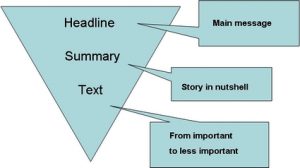
A good quality online text is usually built in the manner of a newspaper article where the most important material is placed first. You should write the most significant content at the beginning and continue to the less important parts – after that, you can return to the start and add an introduction. The introduction can then be used as a base for the headline, which should essentially offer a description of the story in a nutshell.

triangle

The Eye Follows the Left Side of the Text

The news story structure quickly answers the needs of an online reader. The point of the text is presented in the first few lines, and an impatient browser is not going to read much else. Jacob Nielsen has used a camera which tracks the eye movements and stated that electronic newsletters are read in an F-shaped pattern. The headlines and a few first lines are looked through, but after that the eye starts to slide down the left side without really stopping. So you should always pay particular attention to the headlines and the first words in a line of text.

Readability Above All

The writing should remain light both online and on paper. Without noticing it themselves, people are often tempted to write about their own field using jargon that may be incomprehensible to outsiders. You should look at your own text from the perspective of someone outside your group: abbreviations, terminology and long compounds are always less clearly understood than is assumed. Think and write practically: don’t talk about “media” if you specifically mean The New York Times.

Brevity is a virtue. Whenever possible, replace a long expression with a short one. Fight for every word and character. A compact piece of writing is always better than a fumbling long one. In particular, beware of strange, long compound words and the noun-heavy jargon style.

Practice by writing 140 character messages on the subject on Twitter. You’ll get great ideas for headlines as well as introductions – and you’ll notice that longer text is often unnecessary.

Filed Under: In English, In English, Makumatka verkkokirjoittamiseen, Spice Up Your Online Writing

Super Cool Hyper Link

13.1.2017

Online text consists of many independent parts that are linked together. The texts must be written in such a way that they work independently, but can also be easily linked to other pieces of writing.

For Those Who Need More Information

A link connects two parts of the content on one page, or two separate pages. Sometimes people talk about structural and associative links; the first serve the purposes of navigation and the latter offer additional information.

Links that give extra information can lead to either the content on your own page or somewhere else. It has become customary that internal links to your own website open in the same browser window, while the pages outside your website open to a new window – even though some usability experts have expressed differing views on the matter.

If the text is long, its usability can be enhanced by adding a linked list of contents. The subtitles come straight after the main headline – usually one below the other and sometimes side-by–side, separated by a vertical line. A list of contents takes up some of the precious space from the top of the screen, but it offers the reader the possibility to pick up the information he needs without scrolling down the page.

Link Your Key Words

When naming your links, you should follow a consistent practice: you can lead to pages by using only the name or an address – or both. The first alternative is the easiest for the reader, however. While thinking about naming the links, you should focus on what best serves the reader. Keywords support skimming very well, while long links make the text seem patchy, while choosing only pronouns offer poor predictions for content. For example: “You can read about Twitter here” should be changed to “Are you interested in Twitter?

You should provide enough clues in your text to show what the content of your link is. The better the reader is able to predict the content opening with a link, the less there will be unnecessary clicking. Transparent links, names and titles make the text more usable.

Spice Up Your Online Text with Links

Links that offer additional information are a part of web texts and should not be avoided. However, they should be chosen with care. You’ll find that general explanations, argumentation, examples and new perspectives are useful extra material. Even so, it’s better to offer a few specific links rather than ten random ones as well as clarify their purpose. The links should naturally also be functional and up-to-date – it’s extremely frustrating to click on a link and find that it’s missing or ‘dead’.

Students are often offered additional material in other file formats. The essential content of these should provide a short explanation on the web text, so that the reader can predict whether the file should really be opened or not. The link of the file should make clear what the form of the file (pdf, doc, ppt, etc.) and its size are – for example, IT vocabulary (Word document, 24 kbts).

Filed Under: In English, In English, Makumatka verkkokirjoittamiseen, Spice Up Your Online Writing

Does Your Tone Encourage Conversation?

12.1.2017

Two-way interaction is at the core of social media. Following and sharing information go hand-in-hand. If you don’t have the time to follow what other people are saying, you won’t be able to fit your own message into the conversation.

Be Genuine and Positive

Controlling the tone of the messages is an important skill if you mean to be active online. As general advice, one could say that positivity and willingness to interact suit the web as well as other kinds of communication. Honest dialogue which impartially considers different opinions is the most useful for all parties.

Messaging in social media is often placed somewhere between speech and writing. In speech, various tones can be expressed in many ways, but in written dialogue the way of saying things easily becomes monotonous. Naturally the tone control varies between different writers, but the tone of one individual writer is surprisingly permanent. It’s interesting to study both your own and others’ messages, while keeping in mind the question of tone: how do the various expressionsfeel? With respect to tone, it isn’t important to be concerned about the literal content of the message, but rather what it feels like.

Humour is difficult to master, but some levity is always called for. The advantage of humour is that it allows you to keep a healthy distance, but in an emergency excess tension can be loosened with asmiley. You can forget about unnecessary pomposity as studies prove that the more you let your personality show, the more interesting you become in an online environment.

Read and Re-Read Every Message and Answer

You should always make sure that you start and finish your messages in a friendly way, because negativity only tends to aggravate others. An instructive, authoritative style of presentation in the manner of “this is how it is” comes across as stifling, while the same content formulated “I think this is how it is” invites participation. Your tone is generally made better if you have the patience of mind to read other people’s messages a few times and not react too quickly. It is often beneficial for the atmosphere of the conversation to cite the responses others have given and thereby prove that you’ve read and understood them.

Directing interaction takes skill, as it should be done in the spirit of free conversation without a teacher-like attitude and authority. The participants should be given time to form their opinions so that the first and last comment don’t always come from the teacher. Flexible communication is supported by an atmosphere that promotes contemplation – where the aim is not in getting right or wrong answers, but a conversation having many voices.

Are Online Conversations Impartial?

Online interaction has been interpreted as more democratic and less tied to the speaker’s social position than face-to-face conversations. The matter does however call for more thorough investigation, because more and more often – even on specialist message boards – you will run into participants who feel that their comments have been ignored. Power settings have an impact online too, but they are not necessarily formed in the same way as in face-to-face communication.

A new feature in social media communication is its multi-centeredness as well as publicity, which make the conversations more varied but also demand that you learn the rules of public conversations and the proper netiquette. The quality of the conversation is usually improved if you use your own name or you’re able to connect the user name with the right person.

Filed Under: In English, In English, Makumatka verkkokirjoittamiseen, Spice Up Your Online Writing

Interact and Express Yourself

11.1.2017

In his study In the Borderline of the Traditional and Social Media, Janne Matikainen examines why people bother to write for free in blogs and online communities. Earlier studies have emphasized the need for attention, but now the more important reasons were revealed to be self-expression, interaction with others and the implementation of web ideology. The roles of producer and consumer are mixed in social media, and active online communities have no need of the old media gate keepers.

Make Yourself Heard with a Blog

Clearly there has been a need for dialogue which complements main stream media, when you think, e.g. about the massive quantity of blogs. There are an estimated hundred million blogs in the world – and new ones are being created every second. The comments and connections – or the way blogs converse with each other – are as important as the blogs themselves. At its best, a blog community is a medium of alternative conversation which complements mainstream publicity. It is exciting that Jukka Kemppinen – or any popular blogger – can receive dozens of comments.

A blog has to be interesting to attract readers, but how to write appealing blog posts? First and foremost, you should have something to say and you should have the courage to state your case decisively. A clear message expressed in a concise manner suits blogging. Your own personality and voice can be heard in the text, and the readers can be activated to leave comments, for example, with open questions.

The Popularity of Short Updates has Increased

The peak popularity of blogs seems to be fading, however, because young people in particular prefer to use microblogs for shorter updates. Even so, Twitter can also be used to promote longer blog posts. You can pick some questions or statements that might get readers on the hook and shape them into Twitter messages. You can then link the message to your blog post. In the ideal situation, your clues are somehow connected with a conversation that is already ongoing. You can also practice how to formulate a good Tweet.

Facebook updates are very similar to Twitter messages. Brevity and participation are virtues when updating, but the tone of the conversation is normally more entertaining on Facebook, which should be considered. The benefit of Facebook is a wide user base which shows in the number of comments. When I have crowdsourced a problem simultaneously on Twitter and Facebook, the first one usually produces four or five answers and the second usually several dozens.

You’ll learn to write interesting messages by practising and analyzing good texts. The next slides give you some good tips, even if the presentation is based on marketing. After all, marketing skills do no harm to us as teachers either, do they?

Filed Under: In English, Spice Up Your Online Writing

The word of the week is sales quote.

9.1.2017

Last week I worked with a car dealer on electronic communications. Car salespeople are skilled professionals in face-to-face settings, but sales through writing can feel unnatural to them. When they’re working in person with a customer, features, benefits, and counter-proposals flow freely, but in email, the salesperson’s vocabulary drops to just a few works. “Quote attached.”

What makes a strong selling reply to a customer query? The customer needs to feel that she’s been heard, which is why the salesperson must carefully address each of the customer’s questions. It’s no disgrace for the salesperson to show that effort has gone into the reply. “I checked with other dealerships and found the model and color you wanted.” Just as with speech, in writing the successful salesperson presents the strongest sales proposition, supported by relevant features (“low mileage and only one owner”) and details (“fully serviced just last month”). All potential buyers are interested in price, and that figure shouldn’t be hidden. At the same time, the salesperson can set it in the most advantageous context.

Most important, the seller should invite the customer to take the next step toward a deal. (“I can have the car ready for you as soon as Tuesday.”) A firm offer from the buyer is terrific; a good relationship between buyer and seller makes an offer more likely. It’s easier for someone to say no to an impersonal dealership than to an actual dealer who’s written in a engaging, human tone.

Filed Under: In English, Word of the Week

  • « Previous Page
  • 1
  • …
  • 9
  • 10
  • 11
  • 12
  • 13
  • …
  • 30
  • Next Page »

Search

    Request a quote.

    We offer training on writing, communications, e-learning and social media.

    Yksityinen kielitoimisto

    Tampere
    Puh. 040 5702 901
    info@yksityinenkielitoimisto.fi© 2026 · Yksityinen kielitoimisto · Sollertis

    • Suomi
    • English